Your clipboard,
everywhere.
Copy on one device, paste on another. P2P encrypted sync — no cloud, no accounts, no limits.
Tired of emailing files to yourself? Screenshotting on one machine and uploading to a cloud drive just to open it on another? Copying a password from your phone and retyping it on your laptop?
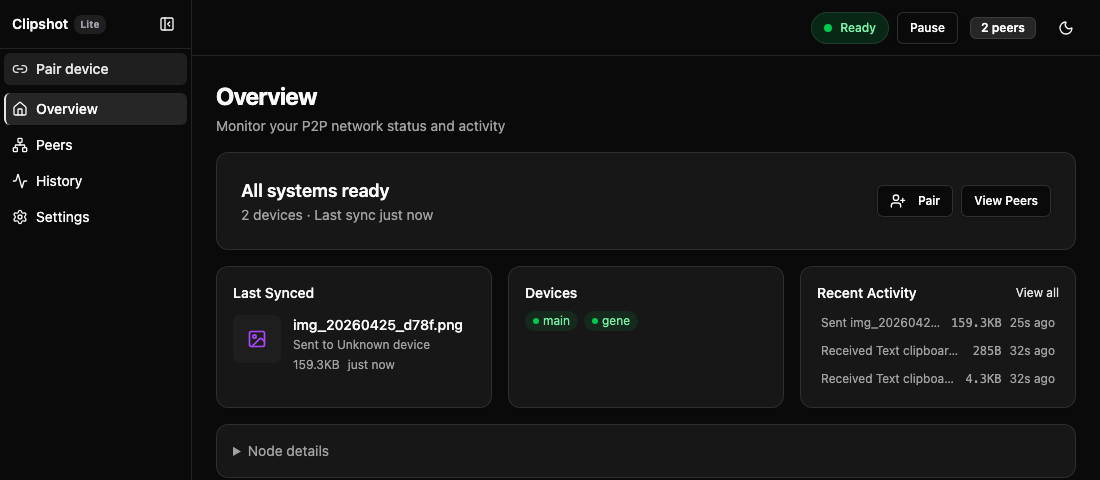
Clipshot removes all of that. Copy anything — text, images, files — and it's instantly on every device you own. No cloud. No accounts. Your devices talk directly to each other, encrypted end-to-end.
A password on your laptop — already on your phone.
A screenshot on your work Mac — waiting on your home desktop.
A file, a link, a code snippet — everywhere, the moment you copy it.
Runs on macOS, Linux, Windows, headless servers, and WSL
How it works
Set up Clipshot in seconds. No cloud account required, just direct device-to-device connection.
Install
One command. curl -fsSL https://clipshot.cc/install.sh | bash
Pair
Generate a code, enter it on another device. Done.
Sync
Copy anywhere, paste everywhere. Automatic.
Built for speed and privacy
P2P Encrypted
Data never touches our servers. Direct mesh networking with QUIC/TLS for ultimate privacy.
Instant Sync
Clipboard changes propagate in milliseconds via high-performance mesh protocol.
Text, Images & Files
Sync everything your clipboard holds — text, screenshots, files up to 10 MB (Pro: any size). Automatic.
Cross-Platform
macOS, Linux, Windows. Desktop GUI, browser UI, headless CLI — one binary, every workflow.
Global Relay
Sync across different networks effortlessly with encrypted high-speed relays.
File Transfer
Send files directly to specific peers. Drag-and-drop, chunked streaming, resume on disconnect.
Auto-Update
Stay current automatically with seamless background updates across all platforms.
Built for power users
Clipshot fits into your workflow, not the other way around. Fast, invisible, and incredibly powerful.
Keyboard First
Full keyboard accessibility and global shortcuts support.
Native Speed
Written in Rust for maximum performance and minimal footprint.
Zero Config
Automatic discovery using mDNS. No static IPs needed.
Simple, transparent
Lite gives you the full experience for 3 devices. Pro removes every limit.
LITE
Everything you need for your main devices.
Up to 3 devices
PRO
Your full device fleet, anywhere you work.
Unlimited devices + relay
Lifetime Pro
Pay once, sync forever. All Pro features — no recurring payments.
Get started in 10 seconds
Download the binary or install via our command line tool.
macOS: if you see “app is damaged” after install, run:
xattr -cr /Applications/Clipshot.appbrew install --cask axelbaumlisto/clipshot/clipshotFrequently Asked Questions
Everything you need to know about Clipshot.